Climate Week
The home of U-M's annual Climate Week. I built the launch site in 2025 and came back in 2026 to rework how events are tagged, filtered, and archived.
Two phases of work
Climate Week runs for about a week each fall, so the site has two jobs: promote the week while it's coming, and be a useful record of it afterward. Both phases run on the same stack, with Eleventy building the site from content in Sanity and the event calendar at the center.
-
Phase 1: The 2025 launch site
I built the first version over the summer of 2025 for the first Climate Week: a homepage with featured events, a calendar grouped by day with a day navigation sidebar (an accordion on mobile), a news section, and flexible content pages. Editors manage all of it in Sanity, including a custom Studio view for choosing which events are featured on the homepage. The news section handles articles, links to coverage elsewhere, and featured video.
-
Phase 2: Tags and filters for 2026
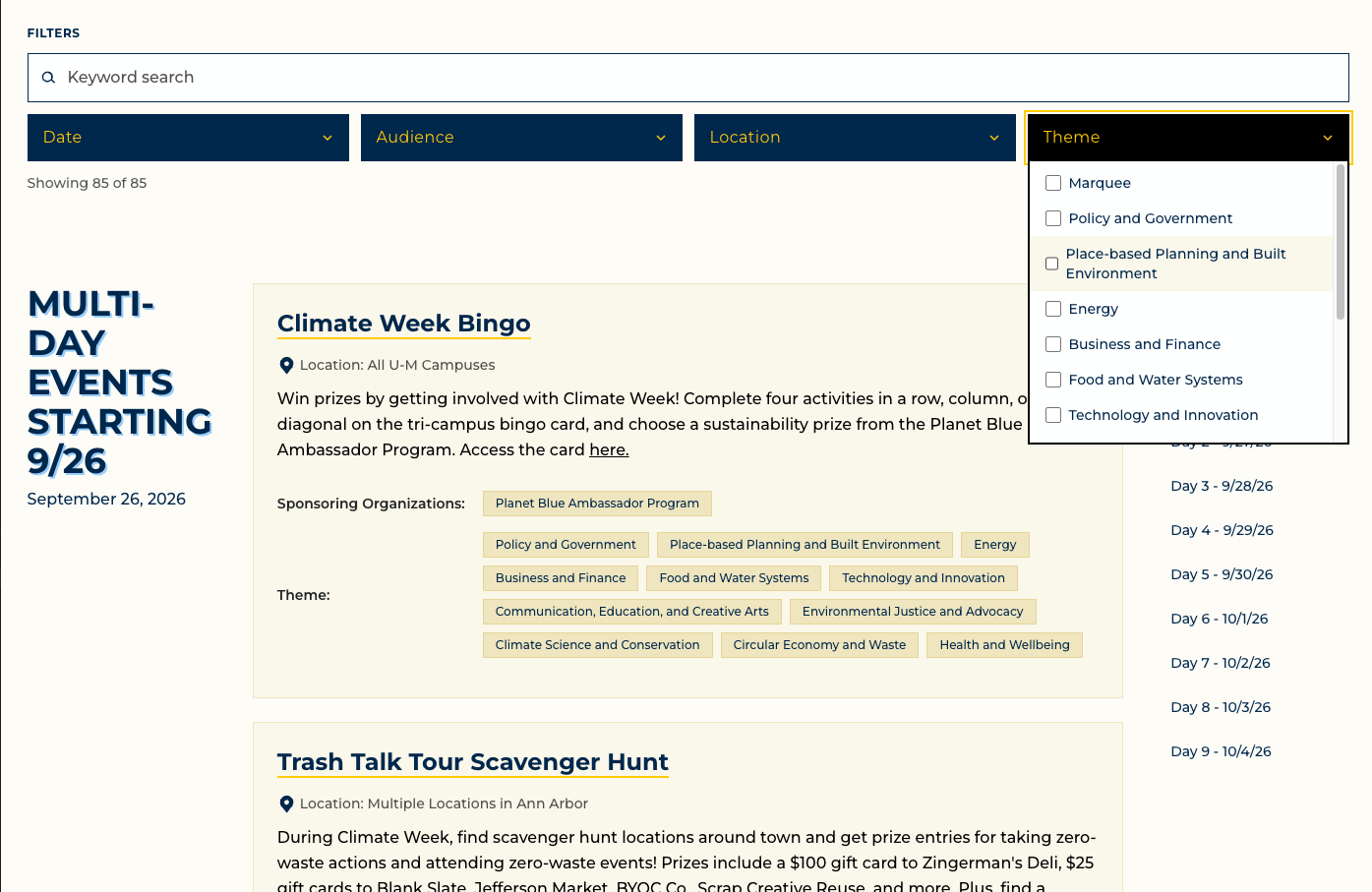
For year two, the client approved lists of audiences, locations, and themes, and every event now carries those tags. The lists live in one file that both Studio and the frontend import, so the Studio fields and the dropdown options can't drift apart. The calendar gained keyword search and Date, Audience, Location, and Theme filters, with a live count and a clear button. Filtering runs in the browser with Alpine.js against events already on the page, so it needs no server and no new dependency. The filter state is written to the URL, so a filtered view can be shared or refreshed.
-
Phase 2: An archive that flips itself
Once a Climate Week is over,
/calendar/switches itself into a read-only archive, and past years live at/calendar/archive/with a Year filter. The active year is calculated from the events in Sanity, so there is no switch for anyone to flip. Because the site is static, a daily scheduled build makes sure the change actually appears on January 1. -
Phase 2: Links, news, and handoff
The client also asked for clearer links, so event titles are underlined, focus styles are stronger, and rich text accepts email and phone links. Deep links from the homepage scroll to the right event or day once the calendar is visible, and they still work when filters are applied. The news section gained pagination and categories. I wrote a CMS training guide and a technical overview for the team, and set up a staging site with per-PR previews and a client sign-off checklist.
Making a static site keep up
Filtering has to keep the rest of the page in order. When filters hide every event in a day, that day's heading and its entry in the day navigation disappear too, and deep links from the homepage still have to scroll to the right event after filters apply. Matching is one pure function with a self-check, so the rules (AND across filters, OR within a multi-select) can be tested without a browser. The dropdowns are custom controls, so keyboard behavior is part of the build: focusable triggers, Escape to close, and visible focus styles.
A static site can't notice that the year changed. The archive depends on today's date, so the site also rebuilds on a daily schedule, the same safety net I used on Look to Michigan. The rollover is computed from the events already in Sanity, so publishing next year's first event puts /calendar/ back in live mode on the next build.
- 85 events across nine days in 2026, each tagged by audience, location, and theme
- Keyword search plus four filters, with shareable URLs
- `/calendar/` becomes an archive automatically after December 31
- Daily scheduled build, so date-driven changes go live without a deploy
- Static Eleventy site with WebC components and no new runtime dependency
- Staging site and per-PR previews, with a client sign-off checklist